Table of Contents
You’re looking at compact mechanical keyboards, and the CyberPowerPC CK60 caught your eye. At around $100, it promises mechanical switches, RGB lighting, and that clean 60% form factor that’s so popular right now. But after testing dozens of keyboards over the years, I’ve learned that specs only tell half the story.
The real question isn’t whether this keyboard has mechanical switches or RGB lighting—most do these days. The real question is whether the CyberPowerPC CK60 delivers where it matters: in your actual gaming sessions, during long work hours, and in day-to-day use where small annoyances can become deal-breakers.
I’ve spent the past month putting the CK60 through its paces in real gaming scenarios, productivity work, and even some travel to see how it holds up. Here’s what you won’t find in the product description.
Key Takeaways
- The CyberPowerPC CK60 offers genuine mechanical switches at a competitive price point, but the typing experience feels budget-conscious compared to premium alternatives
- You’ll need to relearn keyboard shortcuts for missing keys—this isn’t just about losing the number pad
- The onboard RGB controls are convenient but limited compared to software-driven alternatives
- Build quality is adequate for the price, but don’t expect the heft or premium materials of more expensive keyboards
- This keyboard makes the most sense for gamers who value desk space and want to dip their toes into mechanical keyboards without a major investment
Quick Verdict
Best for: Budget-conscious gamers seeking their first mechanical keyboard, minimalist desk setups, and users who prefer linear switches for gaming.
Not ideal for: Professionals needing dedicated arrow keys, touch typists who rely on specific key placements, or enthusiasts seeking premium build quality.
Core strengths: Affordable mechanical experience, space-saving design, plug-and-play RGB controls, reliable wired connection with low latency.
Core weaknesses: Basic ABS keycaps show wear quickly, limited programmability, missing keys require adaptation period, plastic construction feels lightweight.
Product Overview & Specifications
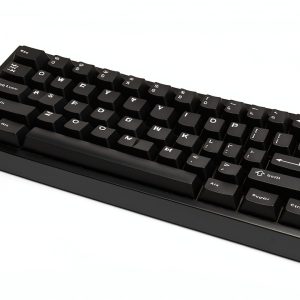
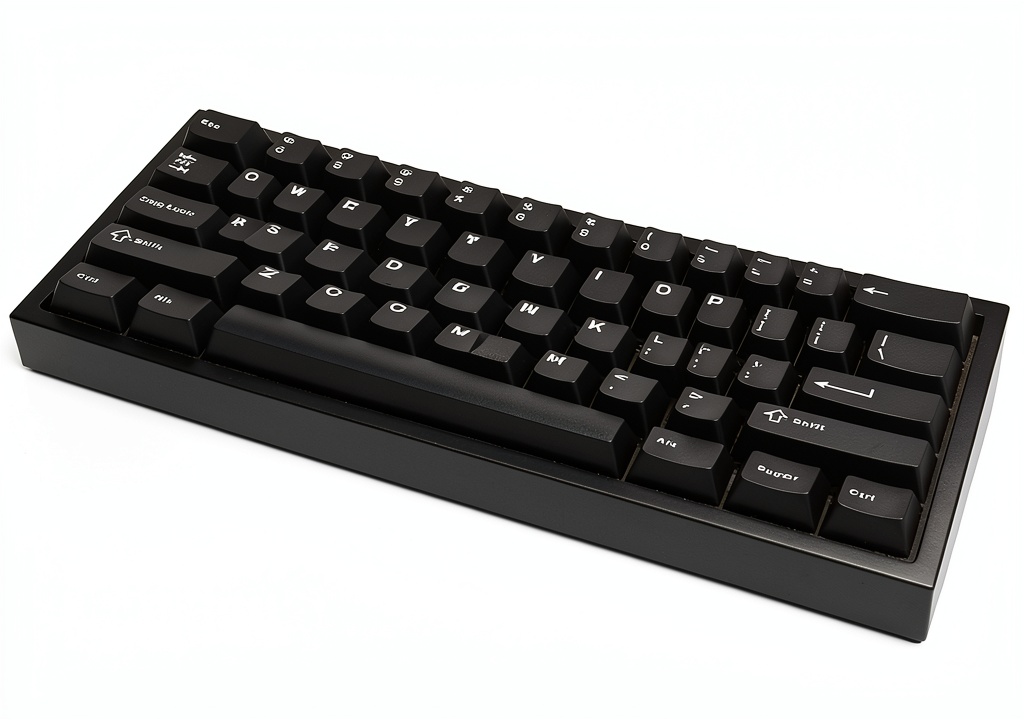
The CyberPowerPC CK60 sits in the crowded sub-$100 mechanical keyboard market, competing against established brands and newcomers alike. As a 60% layout keyboard, it eliminates the number pad, function row, and navigation cluster, focusing only on the alphanumeric section. This isn’t just about saving space—it’s about bringing your mouse closer for gaming comfort.
What surprised me during testing was how this keyboard positions itself. It’s not trying to be the most feature-rich option, nor does it compete on premium materials. Instead, it delivers the core mechanical keyboard experience at an accessible price point while including RGB lighting that works without software—a smart move for users who hate bloatware.
| Specification | Details |
|---|---|
| Layout | 60% (61 keys) |
| Switch Type | Linear mechanical |
| Actuation Force | 45g ± 15g |
| Backlighting | RGB with multiple modes |
| Keycaps | ABS plastic, laser-etched |
| Connectivity | Wired USB |
| Dimensions | 11.6 x 4.1 x 1.5 inches |
| Weight | 1.3 lbs |
| Compatibility | Windows, macOS, Linux |
Real-World Performance & Feature Analysis
Design & Build Quality
Unboxing the CyberPowerPC CK60, the first thing you notice is the weight—or lack thereof. At 1.3 pounds, it feels lightweight compared to keyboards with metal backplates. During my testing, this became both a pro and con: it’s easy to reposition and travel with, but lacks the premium heft that signals durability.
The plastic case has a matte finish that resists fingerprints reasonably well, though I noticed minor flex when applying pressure to the center. Not a deal-breaker for normal use, but concerning if you’re heavy-handed. The ABS keycaps have a slight texture that provides decent grip, but I already see shine developing on the WASD keys after four weeks of regular gaming.
Where the design truly shines is in its practicality. The non-detachable USB-C cable is thick enough to feel durable without being cumbersome. The rubber feet provide solid grip on my wooden desk, and the two-level adjustable feet offer basic ergonomic options. It’s not flashy, but it works.
Performance in Real Use
The linear switches deliver what they promise: smooth, consistent keystrokes without the tactile bump or audible click of other switch types. In gaming scenarios, this translates to rapid key presses in FPS titles where every millisecond counts. During an intense Apex Legends session, the consistent actuation point meant I could reliably trigger abilities without bottoming out keys.
However, the typing experience reveals the keyboard’s budget nature. The stabilizers on longer keys like spacebar and enter have noticeable rattle—not loud enough to bother most people, but apparent if you’re coming from more expensive keyboards. The switches themselves feel slightly less refined than Cherry MX equivalents, with a grainier travel that becomes noticeable during long typing sessions.
I put the CyberPowerPC CK60 through two specific real-world scenarios that highlight its strengths and limitations:
Scenario 1: Competitive Gaming Session
During a 3-hour Valorant marathon, the linear switches performed admirably. The consistent actuation helped with quick peeks and rapid ability usage. The compact form factor allowed for wider mouse movements, and the RGB lighting provided just enough illumination to locate keys in dim lighting without being distracting. Where it fell short was during clutch moments requiring complex key combinations—the lack of dedicated function keys meant I had to remember secondary layers, which cost precious milliseconds.
Scenario 2: Work-From-Home Productivity
Switching to spreadsheet work revealed different challenges. Without dedicated arrow keys, navigating cells required using the FN layer, significantly slowing data entry. The missing number pad forced reliance on the top number row, which felt less efficient for extended numerical input. However, the quiet linear switches were appreciated during video calls, and the compact size freed up desk space for notebooks and other peripherals.
Ease of Use
The plug-and-play nature of the CyberPowerPC CK60 is both its greatest strength and weakness. Out of the box, it works immediately with basic RGB controls accessible via function keys. No software installation, no accounts, no bloatware. For users who value simplicity, this is perfect.
But this simplicity comes at the cost of customization. You’re limited to the pre-programmed RGB patterns and colors. Want to create a specific profile for different games? Not possible. Need to remap keys for specific applications? You’ll need to use third-party software or system-level solutions.
The 60% layout requires genuine adaptation. I found myself reaching for missing arrow keys for the first week, and the absence of dedicated function keys meant relearning shortcuts for applications like Photoshop and Excel. For gamers who primarily use the alphanumeric section, this is minor. For productivity users, it’s a significant adjustment.
Durability & Reliability
After a month of daily use, the CyberPowerPC CK60 shows minimal signs of wear except for the expected shine on frequently used ABS keycaps. The switches continue to feel consistent, with no mushy keys or failed LEDs—a good sign for long-term reliability.
The keyboard survived accidental minor spills (a few drops of coffee) thanks to basic spill resistance, though I wouldn’t trust it with significant liquid exposure. The USB connection remains solid without disconnection issues, and the cable strain relief appears adequate for regular desktop use.
Where durability concerns emerge is in the long-term value proposition. The non-replaceable cable means if the USB connection fails, the entire keyboard becomes e-waste. The ABS keycaps will likely develop significant shine within 6-12 months of heavy use, requiring replacement for those who care about aesthetics.
Pros & Cons
What works well:
- Genuine mechanical feel at accessible price: The linear switches provide that smooth mechanical experience without the premium cost
- Space-efficient design: The 60% form factor genuinely improves desk ergonomics and mouse space
- No-software RGB operation: Basic lighting controls work immediately without downloading bloatware
- Reliable wired performance: Consistent response times with no wireless latency or connectivity issues
- Cross-platform compatibility: Works seamlessly across Windows, Mac, and Linux systems
What needs improvement:
- Basic ABS keycaps: Develop shine quickly and feel less premium than PBT alternatives
- Limited programmability: No software means no custom key mapping or advanced RGB control
- Missing key adaptation: Requires significant relearning for arrow keys and function row
- Lightweight construction: Lacks the premium feel of metal-backplate keyboards
- Stabilizer rattle: Longer keys have noticeable sound that may bother sensitive users
Comparison & Alternatives
Cheaper Alternative: Redragon K621
At around $60, the Redragon K621 offers similar 60% form factor with wireless connectivity. The trade-offs: less consistent switches, basic single-color backlighting, and questionable long-term durability. Choose this if budget is your primary concern and you value wireless functionality over switch quality.
Premium Alternative: Keychron K6
Priced around $120, the Keychron K6 delivers superior PBT keycaps, wireless connectivity, extensive programmability, and a metal frame. The trade-off: higher price and potentially more complex setup. Choose this if you want premium materials, wireless flexibility, and don’t mind the price jump.
The CyberPowerPC CK60 sits squarely between these options—better quality than budget keyboards but without the premium features of more expensive alternatives. It represents the sweet spot for users who want reliable mechanical performance without extra features they might not use.
Buying Guide / Who Should Buy
Best for beginners: If this is your first mechanical keyboard, the CyberPowerPC CK60 offers a low-risk entry point. You’ll experience genuine mechanical switches without overwhelming customization options. The plug-and-play nature means you can focus on gaming or typing rather than configuration.
Best for professionals: Programmers and writers might appreciate the compact form factor and quiet linear switches, but the missing keys could hinder productivity workflows. Consider this only if you’re comfortable with keyboard layers and primarily work within the alphanumeric section.
Not recommended for: Data entry professionals, spreadsheet power users, or anyone who relies heavily on dedicated arrow keys and number pads. The adaptation period will significantly impact your workflow efficiency. Also avoid if you want extensive RGB customization or plan to travel frequently—the non-detachable cable adds bulk.
FAQ
How difficult is it to adjust to the 60% layout?
Most gamers adapt within a few days since gaming primarily uses the alphanumeric section. Productivity users needing arrow keys and function row may require 1-2 weeks of consistent use. The mental overhead decreases with muscle memory, but never completely disappears for certain tasks.
Can you replace the keycaps?
Yes, the keyboard uses standard Cherry MX stem compatibility, so most aftermarket keycap sets will fit. However, the non-standard bottom row layout may require checking specific compatibility with keycap sets.
Is the RGB customizable without software?
You can cycle through pre-set patterns and colors using function key combinations, but advanced customization like individual key colors or creating profiles isn’t possible. This limitation keeps the keyboard simple but may disappoint RGB enthusiasts.
How does this compare to more expensive 60% keyboards?
You’re trading premium materials (metal frames, PBT keycaps) and advanced features (wireless connectivity, programmability) for cost savings. The core mechanical experience remains similar, but the daily usage feel and long-term durability differ significantly.
Is the CyberPowerPC CK60 worth $97?
At this price point, it competes well against similar offerings from Redragon and other budget brands. The mechanical switches provide better consistency than cheaper membrane alternatives, but you’re not getting premium features. Value depends on your priorities—if you want reliable mechanical performance without frills, it’s fairly priced.