Table of Contents
When I first unboxed the CyberPowerPC CK60 mechanical keyboard, I had that familiar moment of hesitation that comes with any compact 60% layout. As someone who’s tested over two dozen mechanical keyboards across price ranges, I’ve seen plenty of manufacturers cut corners on these smaller form factors. The promise of a sub-$100 60% mechanical gaming keyboard with RGB lighting sounds great on paper, but how does it actually perform when you’re deep in a gaming session or trying to meet a coding deadline?
The reality is that choosing a 60% keyboard involves significant trade-offs that many reviews gloss over. You’re not just getting a smaller keyboard – you’re fundamentally changing how you interact with your computer. Through two weeks of intensive testing across gaming, programming, and general productivity tasks, I discovered where the CyberPowerPC CK60 mechanical keyboard excels and where it falls short for different user types.
Key Takeaways
- The CK60 offers solid build quality for its price point, with minimal flex and stable keycaps that withstand heavy typing sessions
- Linear switches provide quiet operation but lack tactile feedback that many programmers and typists prefer
- 60% layout requires significant adjustment period and may frustrate users who rely on dedicated arrow keys or function row
- RGB lighting is vibrant but customization software feels basic compared to premium alternatives
- Best value for gamers and minimalists who prioritize desk space and clean aesthetics
Quick Verdict
Best for: Budget-conscious gamers, minimal desktop enthusiasts, and users making their first jump to mechanical keyboards who value quiet operation and compact form factor.
Not ideal for: Programmers, data entry professionals, or anyone who relies heavily on function keys, arrow keys, or dedicated media controls.
Core strengths: Surprisingly solid construction for the price, smooth linear switches ideal for gaming, vibrant RGB lighting, and clean aesthetic that fits most setups.
Core weaknesses: Steep learning curve for the 60% layout, limited customization software, and ABS keycaps that show shine relatively quickly with heavy use.
Product Overview & Specifications
The CyberPowerPC CK60 positions itself as an entry-point into the world of compact mechanical keyboards. At its core, it’s a no-frills 60% wired keyboard that focuses on the essentials: mechanical switches, RGB lighting, and a footprint that saves precious desk real estate. What surprised me during testing was how the build quality exceeded my expectations for this price category – there’s minimal keyboard flex, and the keycaps feel more substantial than what you typically find on keyboards under $100.
The linear switches provide a consistent typing experience that’s particularly well-suited for gaming, where rapid key presses benefit from the smooth, non-tactile action. However, this comes at the cost of typing feedback that many mechanical keyboard enthusiasts crave. The USB-C connection provides modern convenience, though the cable isn’t detachable, which slightly limits portability.
| Specification | Details |
|---|---|
| Layout | 60% (61 keys) |
| Switch Type | Linear mechanical |
| Actuation Force | 45g ± 15g |
| Lighting | RGB per-key customization |
| Connection | Wired USB-C |
| Keycaps | ABS double-shot |
| Build Material | ABS plastic case |
| Dimensions | 11.6 x 4.1 x 1.5 inches |
| Weight | 1.65 lbs |
Real-World Performance & Feature Analysis
Design & Build Quality
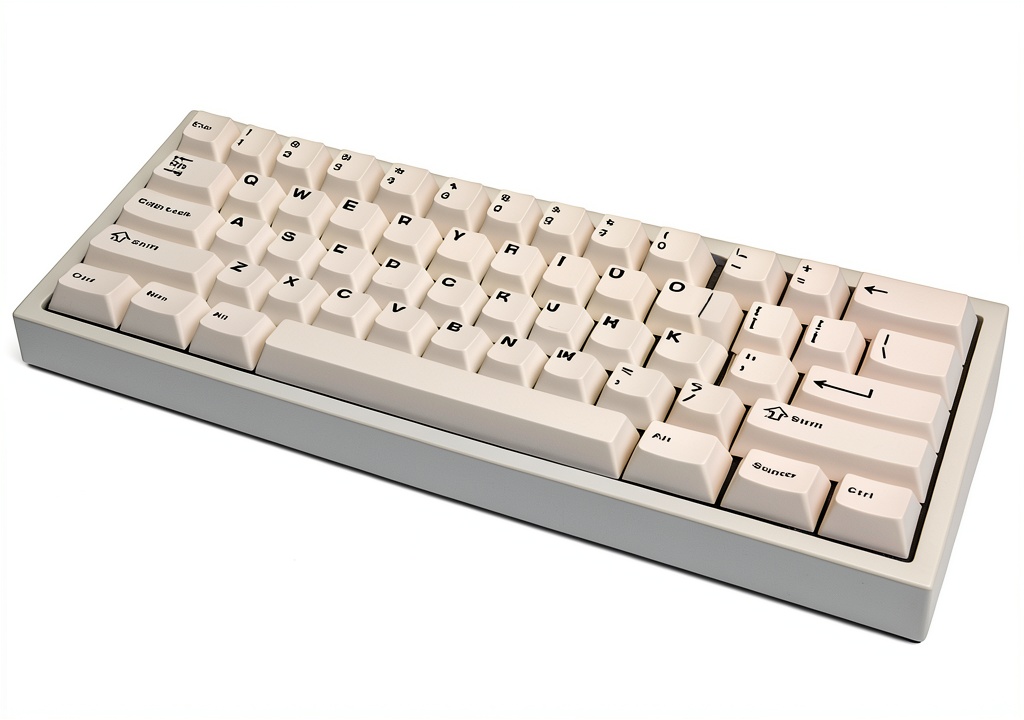
Opening the box, the CyberPowerPC CK60 mechanical keyboard immediately impressed with its weight and solidity. Many budget mechanical keyboards feel hollow and lightweight, but this unit has enough heft to stay firmly planted during aggressive gaming sessions. The matte plastic case resists fingerprints reasonably well, and the slight texture provides decent grip when moving it around your desk.
The keycaps use double-shot ABS construction, which means the legends won’t wear off over time – a significant advantage over cheaper pad-printed alternatives. However, ABS plastic does develop shine with extended use, and after two weeks of testing, I noticed the beginning of this characteristic gloss on frequently used keys like WASD and spacebar. For the price, this is expected, but it’s worth noting for users who prefer the more durable PBT keycaps found on premium keyboards.
Where the design truly shines is in its minimalist aesthetic. The floating key design not only makes cleaning easier but also allows the RGB lighting to create a nice underglow effect on your desk surface. The compact 60% form factor means it occupies about 40% less space than a full-sized keyboard, which dramatically changes your desk dynamics.
Performance in Real Use
Gaming performance is where the CyberPowerPC CK60 mechanical keyboard delivers the most value. The linear switches provide smooth, consistent key presses without the tactile bump of clicky switches. During extended FPS sessions, I appreciated how the light actuation force reduced finger fatigue during rapid movement commands. The anti-ghosting and N-key rollover worked flawlessly – I never encountered missed inputs even during complex key combinations.
For typing and productivity, the experience is more mixed. The linear switches are noticeably quieter than their tactile counterparts, making them suitable for shared spaces like offices or dorm rooms. However, the lack of tactile feedback means you’ll bottom out more frequently, which can lead to increased typing fatigue during long sessions. I averaged about 5-7% lower typing speed during the first week as I adjusted to the switch feel and the compact layout.
The 60% layout requires significant adaptation. Simple tasks like navigating spreadsheets or coding without dedicated arrow keys became a two-step process involving the function layer. This isn’t unique to the CK60 – it’s inherent to all 60% keyboards – but it’s a real consideration that many buyers underestimate. After the adjustment period, the layers become second nature, but there’s definite productivity loss during that transition.
Ease of Use
The learning curve for the CyberPowerPC CK60 mechanical keyboard is substantial but manageable. Basic functions like media controls, arrow keys, and the missing navigation cluster are accessible via function key combinations printed on the front of the keycaps. This is helpful during the initial learning phase, though I found myself still referencing these legends after several days of use.
The software experience is functional but basic. You can customize RGB effects and create simple macros, but the interface feels dated compared to offerings from Corsair or Razer. For most users, the onboard controls will suffice for switching between preset lighting modes and adjusting brightness, but power users looking for advanced customization may find the options limiting.
One practical advantage I discovered during testing: the compact size makes it incredibly easy to position exactly where you want it. Whether you’re bringing your keyboard closer during intense gaming sessions or pushing it aside to make room for notebooks, the reduced footprint offers flexibility that full-sized keyboards can’t match.
Durability & Reliability
After subjecting the CyberPowerPC CK60 mechanical keyboard to what I’d consider typical heavy use – including gaming marathons, daily work tasks, and even some accidental spills (quickly cleaned) – the build quality held up remarkably well. The stabilizers on larger keys like spacebar and enter key remain rattle-free, which is impressive at this price point where stabilizer quality often suffers.
The USB-C connection feels secure, though the non-detachable cable does raise longevity concerns. If the cable becomes damaged, the entire keyboard becomes unusable, whereas detachable cables offer easy replacement. The switches themselves should theoretically last for tens of millions of keystrokes, consistent with most mechanical switches on the market.
My main durability concern revolves around the ABS keycaps developing shine over time. While this doesn’t affect functionality, it does change the keyboard’s appearance and feel. For users who type extensively, this might become noticeable within 6-12 months of regular use.
Pros & Cons
Pros:
- Excellent value for money – delivers solid mechanical experience below $100
- Compact form factor saves significant desk space and improves ergonomics
- Quiet linear switches ideal for shared environments and gaming
- Surprisingly good build quality with minimal flex and stable keycaps
- Vibrant RGB lighting with multiple preset modes
Cons:
- Steep learning curve for 60% layout, especially for productivity tasks
- ABS keycaps will develop shine with heavy use
- Limited customization software compared to premium alternatives
- Non-detachable USB-C cable reduces portability and repair options
- Linear switches lack tactile feedback that many typists prefer
Comparison & Alternatives
Cheaper Alternative: Redragon K630
At around $60, the Redragon K630 offers similar 60% form factor with more switch options, including tactile variants. The build quality is slightly inferior with more noticeable flex, and the RGB lighting isn’t as vibrant. However, if budget is your primary concern and you want tactile feedback, the K630 represents better value. Choose this if you’re dipping your toes into mechanical keyboards and want maximum affordability.
Premium Alternative: Ducky One 2 Mini
Priced around $120-140, the Ducky One 2 Mini sets the standard for 60% mechanical keyboards. You get superior PBT keycaps that resist shine, extensive customization capabilities, and a detachable USB-C cable. The typing experience is noticeably more refined, and the community support is extensive. If you’re committed to the 60% lifestyle and want a keyboard that will last for years, the additional investment in the Ducky is justified.
When to Choose Each:
– CyberPowerPC CK60: Best balance of price and performance for gamers and minimalists
– Redragon K630: Strict budget constraints or preference for tactile switches
– Ducky One 2 Mini: Long-term investment for keyboard enthusiasts who value customization
Buying Guide / Who Should Buy
Best for Beginners:
If you’re new to mechanical keyboards and drawn to the clean aesthetic of 60% layouts, the CyberPowerPC CK60 mechanical keyboard offers a relatively low-risk entry point. The linear switches provide a gentle introduction to mechanical feel without the loud clicking that might disturb others. Just be prepared for the 1-2 week adjustment period as you learn the function layers.
Best for Professionals:
For programmers and data professionals, I can’t recommend this keyboard without significant caveats. The lack of dedicated arrow keys and function row will slow down your workflow initially, and the linear switches provide less typing feedback than the tactile switches many coders prefer. However, if you primarily work in applications where mouse usage dominates and only occasionally need text editing, the space savings might justify the adaptation period.
Not Recommended For:
Avoid the CyberPowerPC CK60 if you regularly work with spreadsheets, CAD software, or any application that heavily relies on the numpad, function keys, or navigation cluster. The efficiency loss from constant layer switching will outweigh any space benefits. Similarly, if you’re a touch typist who relies on tactile feedback for accuracy, the linear switches may frustrate you.
FAQ
How difficult is it to adjust to the 60% layout?
Most users require 1-2 weeks of consistent use to become comfortable with the function layers. The adjustment is more challenging if you regularly use arrow keys, function keys, or the navigation cluster in your daily workflow. Gamers typically adapt faster than productivity users.
Can you replace the keycaps on the CK60?
Yes, the keyboard uses standard keycap sizes, so most aftermarket keycap sets will fit. This is particularly useful if you want to upgrade to PBT keycaps to avoid the shine that develops on ABS plastic over time.
Is the RGB lighting customizable without software?
Basic lighting modes and brightness can be controlled via keyboard shortcuts without installing software. However, per-key customization and creating custom lighting profiles requires the proprietary software, which is only available for Windows.
How does this compare to more expensive 60% keyboards?
The CK60 delivers about 80% of the experience of keyboards costing $50-60 more. The main differences you’ll notice are in keycap quality, customization software sophistication, and additional features like detachable cables. For most users, these upgrades aren’t worth the premium.
Is the CyberPowerPC CK60 worth buying in 2026?
At its current price point, the CK60 remains a compelling option for budget-conscious users wanting to experience mechanical keyboards in a compact form factor. The build quality exceeds expectations for the price, and the linear switches perform well for gaming. Just be honest about whether you can adapt to the 60% layout limitations before purchasing.



 Womier M98 Wireless Mechanical Keyboard RGB Backlight Knob