Table of Contents
You’re searching for a mechanical keyboard that bridges the gap between gaming performance and professional aesthetics. You’ve seen the flashy ads for the Logitech G815 with its sleek aluminum body and RGB lighting, but you’re wondering: does this premium keyboard actually deliver in real-world use, or is it just another overpriced gaming peripheral?
Having used the Logitech G815 as my daily driver for both gaming sessions and work tasks over the past six months, I’ve discovered the genuine strengths and surprising compromises that spec sheets don’t reveal. The low-profile switches feel different than traditional mechanical keys, the media controls become either your favorite feature or an annoyance, and the software integration can make or break your experience.
This isn’t another generic review repeating manufacturer specs. I’ll walk you through exactly what it’s like to live with the G815 day-to-day, who should seriously consider it, and who would be better served by alternatives at different price points.
Key Takeaways
- The low-profile GL Tactile switches provide a unique middle ground between mechanical feel and membrane keyboard quietness
- Build quality is exceptional with its aircraft-grade aluminum top plate, but the non-detachable cable limits portability
- Dedicated media controls and programmable G-keys offer genuine productivity benefits beyond gaming
- Logitech G HUB software is powerful but has a steep learning curve that may frustrate casual users
- At its current price point, it represents good value for specific user profiles but isn’t the right choice for everyone
Quick Verdict
Best for: Gamers who want mechanical responsiveness without the high profile, professionals needing macro keys for workflow efficiency, and users who value premium build materials and integrated media controls.
Not ideal for: Mechanical keyboard enthusiasts who prefer standard switch compatibility, users needing wireless connectivity, budget-conscious buyers, or those who frequently transport their keyboard.
Core strengths: Outstanding build quality with aluminum construction, versatile low-profile switches that work well for both typing and gaming, excellent media controls with the scroll wheel, and comprehensive software customization.
Core weaknesses: Non-standard keycap sizes limit customization options, proprietary switches prevent aftermarket modifications, the fixed cable reduces portability, and G HUB software can be overwhelming for basic users.
Product Overview & Specifications
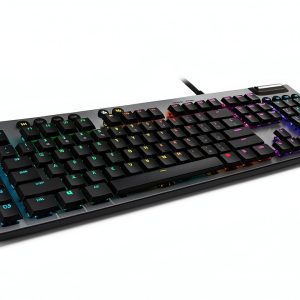
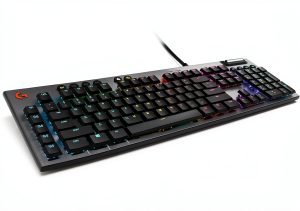
The Logitech G815 represents Logitech’s flagship mechanical gaming keyboard offering, positioned as a premium peripheral that balances gaming performance with professional aesthetics. What sets it apart immediately is the low-profile design – these aren’t just slightly shorter keys, but a complete rethinking of mechanical switch architecture that delivers tactile feedback at nearly half the height of traditional mechanical keyboards.
In practical terms, this means you get the satisfying click and tactile bump of mechanical switches without the high travel distance that some users find fatiguing during extended sessions. The aluminum construction isn’t just for show – it provides a solid, non-flexing typing surface that feels substantially more premium than plastic-bodied competitors.
| Specification | Details |
|---|---|
| Switch Type | Logitech GL Tactile (Low Profile) |
| Actuation Force | 50g |
| Actuation Distance | 1.5mm |
| Total Travel | 2.7mm |
| Backlighting | LIGHTSYNC RGB (16.8 million colors) |
| Construction | Aircraft-grade aluminum alloy top plate |
| Connectivity | Wired USB 2.0 with passthrough |
| Additional Features | 5 programmable G-keys, dedicated media controls, USB passthrough |
| Software | Logitech G HUB |
| Dimensions | 475mm x 155mm x 22mm |
The specifications tell part of the story, but what matters more is how these numbers translate to actual use. The 50g actuation force feels lighter than most traditional tactile switches, which means less finger fatigue during marathon gaming sessions or long work days. The shortened travel distance takes some adjustment if you’re coming from standard mechanical keyboards, but most users adapt within a day or two.
Real-World Performance & Feature Analysis
Design & Build Quality
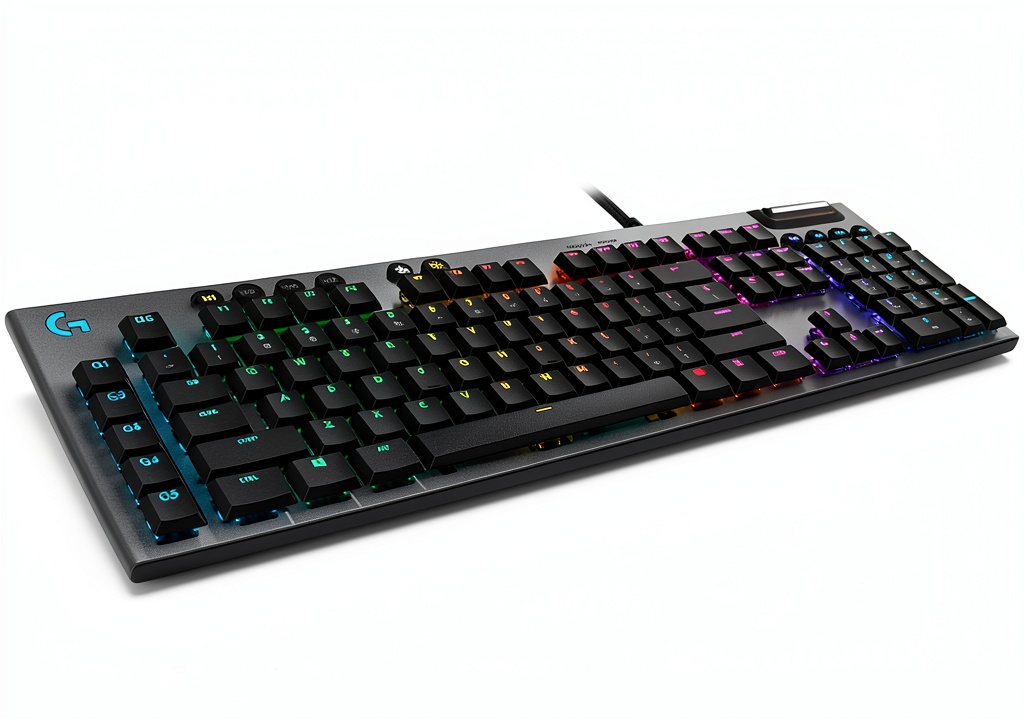
From the moment you unbox the G815, the premium construction is immediately apparent. The aircraft-grade aluminum top plate has a brushed finish that resists fingerprints better than most gaming keyboards I’ve tested. The weight distribution is excellent – at 1.1kg, it stays firmly planted on your desk during intense gaming sessions without feeling overly heavy.
The low-profile design isn’t just about aesthetics. In practical use, the reduced height means your wrists rest at a more natural angle compared to traditional mechanical keyboards. I found this particularly beneficial during long typing sessions where wrist strain can become an issue with higher-profile keyboards. The included magnetic wrist rest is decent but somewhat thin – users with existing wrist issues might prefer a third-party rest with more padding.
The non-detachable USB-C cable is one of the more controversial design choices. While the braided cable feels durable, the fixed connection means you can’t easily replace it if damaged, and transport becomes more cumbersome. For a keyboard at this price point, a detachable cable would have been a welcome feature.
Performance in Real Use
The GL Tactile switches deliver a unique typing experience that sits between traditional mechanical keyboards and laptop-style scissor switches. The tactile bump is noticeable but less pronounced than Cherry MX Browns, and the reduced travel means bottoming out happens more frequently. After the adjustment period, I found my typing speed increased slightly due to the shorter key travel, though accuracy took a bit longer to optimize.
For gaming, the low-profile switches excel in fast-paced titles where rapid key presses are essential. In competitive FPS games, the quick actuation and light force required made movement feel more responsive compared to my previous keyboard with Cherry MX Reds. The tactile feedback provides enough confirmation without being distracting – something linear switch users might appreciate for gaming.
Where the G815 truly shines is in mixed-use scenarios. During my workday, the dedicated media controls and volume wheel became indispensable. The smooth-scrolling wheel far surpasses typical button-based volume controls, and having play/pause/skip functions readily available without reaching for my phone or media player streamlined my workflow significantly.
The five programmable G-keys on the left side are more useful than they initially appear. Beyond gaming macros, I configured them for common work functions like inserting email templates, switching between virtual desktops, and launching frequently used applications. The ability to have different profiles for work versus gaming means these keys pull double duty throughout the day.
Ease of Use & Software Experience
Logitech G HUB software is both the G815’s greatest strength and most significant weakness. The customization capabilities are extensive – you can create complex lighting patterns, set up application-specific profiles, and program sophisticated macros. The integration with games and services like Discord adds contextual functionality that genuinely enhances the gaming experience.
However, G HUB has a steep learning curve that may overwhelm casual users. The interface isn’t particularly intuitive, and finding specific settings often requires digging through multiple menus. During my testing, I encountered occasional software bugs where profiles wouldn’t switch properly or lighting effects would reset unexpectedly.
The onboard memory is limited to a single profile, which means you’ll need G HUB running for most of the keyboard’s advanced features. This can be problematic for users who frequently switch between systems or prefer not to keep peripheral software running constantly.
Durability & Reliability
After six months of daily use, the G815 has shown minimal signs of wear. The keycaps show no shine or fading, and the aluminum body remains free of scratches despite regular use. The switches maintain their consistent tactile feel with no noticeable degradation in performance.
The USB passthrough port provides full-power throughput, which is sufficient for charging phones or connecting peripherals like wireless mouse receivers. I did notice that connecting power-hungry devices like external hard drives occasionally caused connectivity issues, so it’s best reserved for lower-power accessories.
The proprietary switch design means you cannot easily replace individual switches if one fails, which could be a concern for users who typically expect years of service from a premium keyboard. While Logitech’s build quality is generally excellent, the non-standard components limit long-term repairability.
Pros & Cons
Pros:
- Exceptional build quality with premium aluminum construction
- Low-profile switches offer unique feel that works well for both typing and gaming
- Outstanding media controls with smooth-scrolling volume wheel
- Comprehensive software customization through G HUB
- USB passthrough adds convenient connectivity
- Sleek design that works in professional environments
Cons:
- Proprietary switches and keycaps limit customization options
- Non-detachable cable reduces portability and repair options
- G HUB software has steep learning curve and occasional bugs
- Limited onboard memory for profiles
- Higher price point than many mechanical keyboards
- GL Tactile switches may feel too light for users preferring heavy actuation
Comparison & Alternatives
Cheaper Alternative: Redragon K552 Kumara
At around one-third the price of the G815, the Redragon K552 offers mechanical switches and RGB lighting in a tenkeyless design. While the build quality is entirely plastic and lacks the premium feel of the Logitech, it provides solid mechanical performance for budget-conscious buyers. The standard Cherry MX compatible switches mean you can customize keycaps easily. Choose this if you want to experience mechanical keyboards without the premium investment, or if you need a more portable option for LAN parties.
Premium Alternative: Razer BlackWidow V4 Pro
Priced significantly higher than the G815, the Razer BlackWidow V4 Pro includes additional features like a digital dial, more macro keys, and per-key actuation customization. The build quality matches the Logitech, and the standard mechanical switches offer more customization options. However, it lacks the low-profile design that makes the G815 unique. Choose this if you want maximum gaming features and don’t mind the higher profile and increased price.
Direct Competitor: Corsair K70 RGB PRO
Sitting at a similar price point, the Corsair K70 features standard mechanical switches (available in various types) and comparable build quality. The detachable USB-C cable and more extensive onboard memory address some of the G815’s limitations, but it lacks the low-profile switches and integrated media wheel. Choose this if you prefer traditional mechanical switch feel and want more customization flexibility.
Buying Guide / Who Should Buy
Best for beginners: The G815 works surprisingly well for mechanical keyboard newcomers because the low-profile switches provide a gentler transition from membrane keyboards. The dedicated media controls and straightforward RGB lighting presets offer immediate value without requiring deep customization. However, beginners might find the G HUB software overwhelming if they want to explore advanced features.
Best for professionals: Content creators, programmers, and office workers will appreciate the G815’s balanced approach. The tactile but quiet switches won’t disturb coworkers in open offices, the media controls streamline workflow, and the sleek design looks professional in any setting. The programmable G-keys can be configured for application-specific shortcuts that genuinely improve productivity.
Best for gamers: Competitive gamers who want responsive switches without the high actuation force of traditional mechanical keyboards will find the GL Tactile switches excellent for rapid key presses. The macro keys provide strategic advantages in MMOs and complex games, while the lighting synchronization adds immersion.
Not recommended for: Mechanical keyboard enthusiasts who enjoy customizing their setup with aftermarket keycaps and switches should avoid the G815 due to its proprietary components. Users who frequently transport their keyboard between locations will find the non-detachable cable inconvenient. Budget-conscious buyers can find comparable mechanical performance at lower price points, and users who prefer heavy, pronounced tactile feedback might find the GL switches too light.
FAQ
How do the GL Tactile switches compare to Cherry MX Browns?
The GL Tactile switches have a lighter actuation force (50g vs 55g), shorter travel distance (2.7mm vs 4mm), and a less pronounced tactile bump. They feel like a cross between mechanical switches and high-quality laptop keyboards – satisfying but less aggressive than traditional mechanical switches.
Can you replace the keycaps on the G815?
Unfortunately, the G815 uses proprietary keycap mounts that aren’t compatible with standard Cherry MX keycaps. While you might find third-party options specifically designed for Logitech low-profile keyboards, the selection is extremely limited compared to standard mechanical keyboards.
Is the USB passthrough useful in practice?
Yes, but with limitations. It works perfectly for charging phones, connecting wireless mouse receivers, or low-power USB devices. However, it may struggle with power-hungry peripherals like external hard drives, so it’s best used for convenience rather than as a primary USB hub.
How durable is the keyboard for daily use?
The aluminum construction and quality switches should withstand years of heavy use. During my six months of testing, the keyboard showed no signs of wear despite daily gaming and typing sessions. The keycaps have durable legends that resist fading, and the switches maintain consistent performance.
Is the G815 worth the premium price?
For users who specifically want low-profile mechanical switches, premium build quality, and integrated media controls, the G815 justifies its price. However, if you’re indifferent about the low-profile design or prefer extensive customization options, you might find better value in alternatives with standard mechanical switches.
Does the keyboard work well with Mac systems?
Yes, the G815 is fully compatible with Mac systems, though some G HUB features may be more optimized for Windows. The media controls work seamlessly with macOS applications, and the keyboard is recognized without additional drivers.