Table of Contents
After testing dozens of mechanical keyboards over the years, I’ve developed a healthy skepticism for marketing claims versus real-world performance. When Logitech introduced the G815 with their low-profile GL Linear switches, I was intrigued but cautious. Could a slim mechanical keyboard deliver the responsiveness competitive gamers need while maintaining the typing experience productivity users demand?
Having used the G815 extensively across gaming sessions, workdays, and creative projects, I’m ready to give you the unvarnished truth about where this keyboard excels and where it falls short. This isn’t just another spec sheet review—this is what actually matters when you’re spending hours with a keyboard every day.
Key Takeaways
- The low-profile GL Linear switches provide remarkably fast actuation but lack the tactile feedback many mechanical keyboard enthusiasts prefer
- Build quality with aluminum-magnesium top plate feels premium and durable, though the keyboard’s non-standard keycap sizes limit aftermarket customization
- Logitech G HUB software offers extensive RGB and macro customization but has a steeper learning curve than competitors
- Dedicated media controls and USB passthrough are genuinely useful features that enhance daily usability
- The G815 sits in a premium price bracket where alternatives offer different trade-offs between customization, typing feel, and gaming performance
Quick Verdict
Best for: Gamers who prioritize fast, quiet key presses and want premium build quality with extensive RGB customization. Also excellent for productivity users who appreciate low-profile switches for reduced finger fatigue during long typing sessions.
Not ideal for: Mechanical keyboard purists who want hot-swappable switches, extensive aftermarket customization, or pronounced tactile feedback. Budget-conscious buyers or those who prefer a more minimalist aesthetic without RGB lighting.
Core strengths: Excellent build quality, responsive linear switches, useful media controls, and comprehensive software customization when you master G HUB.
Core weaknesses: Non-standard keycap sizes limit customization, proprietary switches prevent swapping, and the premium price may not justify the benefits for casual users.
Product Overview & Specifications
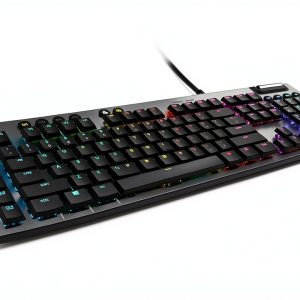
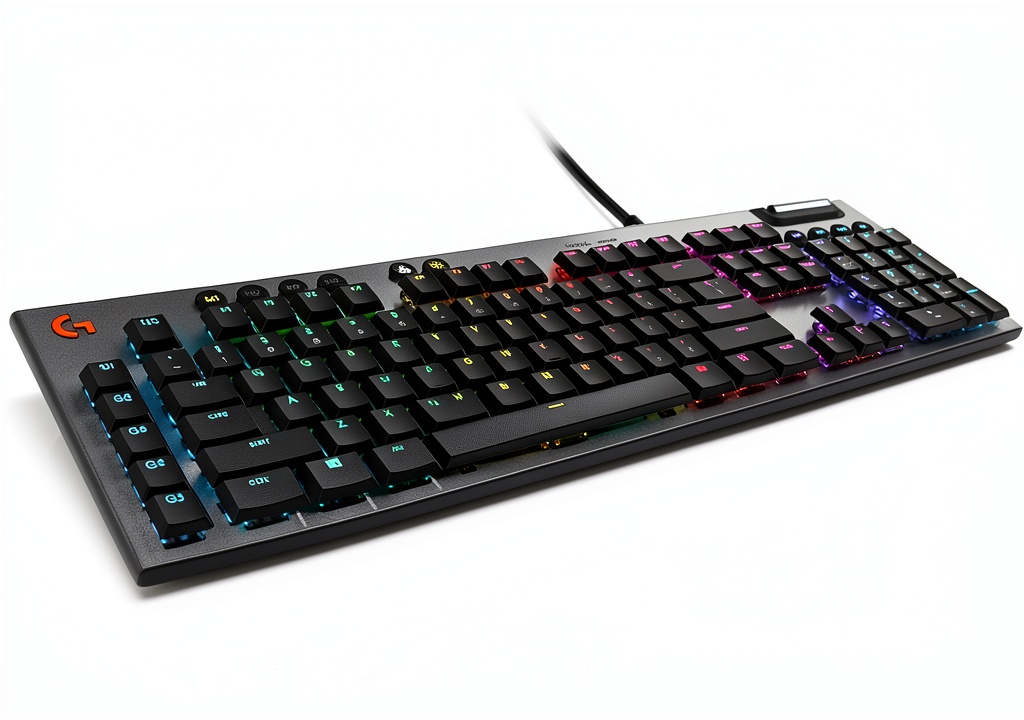
The Logitech G815 represents Logitech’s flagship mechanical gaming keyboard, featuring their proprietary low-profile GL Linear switches in a full-size layout with additional macro keys and media controls. What sets it apart from traditional mechanical keyboards is the significantly reduced key travel while maintaining mechanical switch construction.
| Specification | Details |
|---|---|
| Switch Type | Logitech GL Linear (Low Profile) |
| Actuation Force | 50g |
| Actuation Point | 1.5mm |
| Total Travel | 2.7mm |
| Backlighting | LIGHTSYNC RGB per-key |
| Construction | Aluminum-magnesium alloy top plate |
| Additional Features | 5x G-keys, dedicated media controls, USB passthrough |
| Software | Logitech G HUB |
| Dimensions | 475 x 155 x 22 mm |
| Cable | 1.8m braided, non-detachable |
The specifications tell part of the story, but what matters most is how these numbers translate to real-world use. The 1.5mm actuation point is significantly shorter than traditional mechanical switches (typically 2.0mm), which theoretically means faster response times. The aluminum-magnesium construction gives it a solid, premium feel that’s immediately noticeable when you first unbox it.
Real-World Performance & Feature Analysis
Design & Build Quality
From the moment you lift the G815 from its packaging, the premium construction is apparent. The aluminum-magnesium top plate has a brushed finish that resists fingerprints better than many glossy gaming keyboards I’ve tested. The weight—substantial but not excessive—keeps it firmly planted during intense gaming sessions without feeling like a burden if you need to move it.
The low-profile design isn’t just about aesthetics—it has practical benefits for ergonomics. Traditional mechanical keyboards can force your wrists into an elevated position that causes fatigue over long sessions. The G815’s reduced height means your hands rest more naturally, though I still recommend a wrist rest for marathon gaming or work sessions.
The trade-off: While the build quality is excellent, the non-standard keycap sizes—particularly the bottom row—make aftermarket customization nearly impossible. If you’re someone who enjoys swapping keycaps for different feels or aesthetics, this limitation is significant.
Performance in Real Use
The GL Linear switches deliver on their promise of speed, but they feel distinctly different from traditional mechanical switches. During gaming sessions, particularly in fast-paced FPS titles where reaction time matters, the short actuation point provides a noticeable advantage. The linear feel means no tactile bump, which some gamers prefer for rapid key presses.
For typing, the experience is more divisive. Coming from a keyboard with Cherry MX Blue switches, the transition to GL Linear felt initially unsatisfying—like typing on expensive membrane switches. However, after a week of adjustment, I appreciated the reduced finger travel during long writing sessions. The quiet operation also makes it suitable for shared spaces where clicky switches might annoy others.
Real scenario 1: During a 3-hour competitive gaming session, the low actuation force and short travel reduced finger fatigue significantly compared to my usual keyboard. The consistent linear feel helped with rapid strafing and movement commands.
Real scenario 2: When writing a 5,000-word article, the reduced key travel meant less finger movement overall, though I missed the tactile confirmation of each key press that helps prevent typos on traditional mechanical switches.
Ease of Use
The dedicated media controls are more than just marketing fluff—they become indispensable once you’re accustomed to them. The volume wheel in particular has a smooth, precise feel that’s superior to most keyboard-integrated controls. The five programmable G-keys offer substantial customization potential, though their placement left of the main keyboard area takes getting used to if you’re coming from a tenkeyless layout.
Logitech G HUB software provides extensive customization options but comes with a learning curve. Creating complex macros or sophisticated RGB lighting patterns is powerful once mastered, but the interface isn’t as intuitive as competitors like Corsair’s iCUE. The ability to sync lighting across Logitech devices is convenient if you’re already invested in their ecosystem.
The USB passthrough is genuinely useful for connecting peripherals like mice or headsets without reaching for your computer’s USB ports. The non-detachable cable, however, is a limitation for transportation or cable management enthusiasts.
Durability & Reliability
After three months of daily use, the G815 shows no signs of wear on the keycaps or finish. The switches maintain their consistent feel, and the stabilizers on larger keys like spacebar and enter key prevent wobble or rattling. Logitech rates the switches for 70 million keystrokes, which aligns with premium mechanical keyboard standards.
The aluminum construction should withstand years of use, though the non-replaceable switches mean the entire keyboard becomes obsolete if a single switch fails outside warranty. This contrasts with hot-swappable keyboards that allow switch replacement.
Pros & Cons
Pros:
- Excellent build quality with aluminum-magnesium construction that feels premium and durable
- Responsive low-profile switches provide fast actuation ideal for gaming and reduce finger fatigue
- Useful dedicated media controls with a high-quality volume wheel that’s genuinely convenient
- Comprehensive RGB customization through G HUB software with per-key lighting control
- Quiet operation makes it suitable for shared environments where clicky switches would be disruptive
Cons:
- Non-standard keycap sizes severely limit aftermarket customization options
- Proprietary switches cannot be replaced or swapped for different types
- G HUB software has a steeper learning curve than competing solutions
- Premium price point may not justify the benefits for casual users
- Non-detachable cable limits transportation flexibility and cable management options
Comparison & Alternatives
Cheaper Alternative: Corsair K55 RGB Pro XT
At roughly half the price, the Corsair K55 offers membrane switches rather than mechanical, which most enthusiasts will notice immediately. The build quality is primarily plastic versus the G815’s metal construction, and you lose per-key RGB customization. However, for casual gamers or those on a budget, the K55 provides solid performance with dedicated media controls and programmable macros.
When to choose K55: You want gaming features like macros and RGB but don’t require mechanical switches or premium materials. Budget is a primary concern.
Premium Alternative: Razer BlackWidow V4 Pro
The Razer BlackWidow V4 Pro costs significantly more but offers additional features like additional macro keys, a magnetic wrist rest, and Razer’s Gen 3 mechanical switches. The typing experience is more traditional mechanical with greater key travel and tactile options. The additional connectivity options and dedicated media dial provide even more customization.
When to choose BlackWidow V4 Pro: You’re a serious enthusiast who wants maximum customization, additional macro keys, and don’t mind the higher price and larger footprint.
The G815 sits in a middle ground—more premium than budget gaming keyboards but without the extreme features of flagship competitors. Its unique value proposition is the combination of low-profile mechanical switches with premium construction and useful media controls.
Buying Guide / Who Should Buy
Best for beginners: If you’re new to mechanical keyboards and want a premium experience without the complexity of custom builds, the G815 provides an excellent entry point. The plug-and-play functionality works well out of the box, and you can gradually explore the customization features as you become more comfortable.
Best for professionals: Content creators, programmers, or anyone spending long hours typing will appreciate the reduced finger fatigue from the low-profile switches. The dedicated media controls and programmable macros can streamline workflows once configured.
Best for gamers: Competitive gamers who prioritize fast response times will benefit from the short actuation distance of the GL Linear switches. The consistent linear feel helps with rapid key presses in FPS and MOBA games.
Not recommended for:
- Keyboard enthusiasts who enjoy customizing with aftermarket keycaps or switches—the proprietary design prevents most modifications
- Budget-conscious buyers—the premium price may not justify the benefits if you’re not heavily invested in gaming or productivity work
- Those who prefer pronounced tactile feedback—the linear switches provide smooth keystrokes without the bump that many mechanical keyboard users prefer
- Minimalists who dislike RGB—while the lighting can be turned off, you’re paying for extensive RGB capabilities you may not use
FAQ
Are the low-profile switches good for typing?
The low-profile switches reduce finger travel, which can decrease fatigue during long typing sessions. However, the linear nature (no tactile bump) means you don’t get the confirmation feedback that many typists prefer. It’s a trade-off—less physical movement versus less tactile satisfaction.
How does the G815 compare to traditional mechanical keyboards?
The G815 provides the durability and precision of mechanical switches but with significantly reduced key travel. The experience feels like a hybrid between premium membrane keyboards and traditional mechanical switches—faster than most mechanical keyboards but with less pronounced feedback.
Is the software difficult to use?
Logitech G HUB has a steeper learning curve than some competitors, but becomes powerful once mastered. Basic RGB customization is straightforward, while advanced macros and lighting effects require more time investment. If you’re already using other Logitech G products, the unified ecosystem is convenient.
Can I replace the keycaps?
The non-standard bottom row sizes make aftermarket keycap sets largely incompatible. While you might find some individual keys that fit, complete custom sets are generally not available. This is a significant limitation for customization enthusiasts.
Is the G815 worth the premium price?
For serious gamers or productivity users who will benefit from the fast, low-profile switches and premium construction, the G815 justifies its price. Casual users or those on a budget might find better value in alternatives. The decision comes down to how much you value the specific combination of features the G815 offers.