Table of Contents
You’re researching mechanical keyboards and landed on the Womier RD75 Pro. I’ve been there – staring at product pages filled with technical jargon, wondering if this particular 75% wireless gaming keyboard will actually improve your workflow or just become another expensive desk ornament.
After testing this keyboard extensively across gaming, programming, and daily office work, I can tell you this isn’t just another mech keyboard. The combination of QMK/VIA programmability, tri-mode connectivity, and aluminum construction creates something special – but only for specific users. The real question isn’t whether it’s good, but whether its advanced features justify the learning curve and price for your particular use case.
Key Takeaways
- The aluminum build feels premium but adds significant weight, making it less portable than plastic alternatives
- QMK/VIA programming offers unparalleled customization but requires technical comfort to fully utilize
- Battery life exceeds most competitors, easily lasting weeks between charges with moderate RGB use
- The 75% layout strikes a practical balance between compactness and functionality for most users
- Hot-swappable sockets make switch experimentation accessible to beginners and enthusiasts alike
Quick Verdict
Best for: Programmers, power users, and keyboard enthusiasts who value customization over plug-and-play simplicity. The QMK/VIA support and build quality justify the price if you’ll actually use the programming capabilities.
Not ideal for: Beginners wanting immediate setup, travelers needing lightweight gear, or users who prefer straightforward operation without software tinkering.
Core strengths: Exceptional programmability, premium aluminum construction, versatile connectivity options, and impressive battery life that outperforms most wireless keyboards in this category.
Core weaknesses: Steep learning curve for programming features, heavy build limits portability, and the software experience feels dated compared to mainstream alternatives.
Product Overview & Specifications
The Womier RD75 Pro positions itself as a premium wireless mechanical keyboard that doesn’t compromise on customization. Unlike many gaming keyboards that focus primarily on RGB and marketing claims, this model targets users who understand the value of firmware-level programming and build quality.
| Specification | Details |
|---|---|
| Layout | 75% (84 keys) |
| Connectivity | Tri-mode (USB-C, 2.4GHz, Bluetooth 5.0) |
| Latency | 3ms (wired), 4ms (2.4GHz), 8ms (Bluetooth) |
| Battery | 8000mAh (up to 900 hours) |
| Construction | CNC aluminum frame with gasket mount |
| Switches | Hot-swappable POM linear (pre-lubed) |
| Software | QMK/VIA programmable |
| Stabilizers | Pre-lubricated screw-in |
The specifications tell only half the story. What matters in practice is how these features translate to daily use – something I’ll break down based on real testing scenarios.
Real-World Performance & Feature Analysis
Design & Build Quality
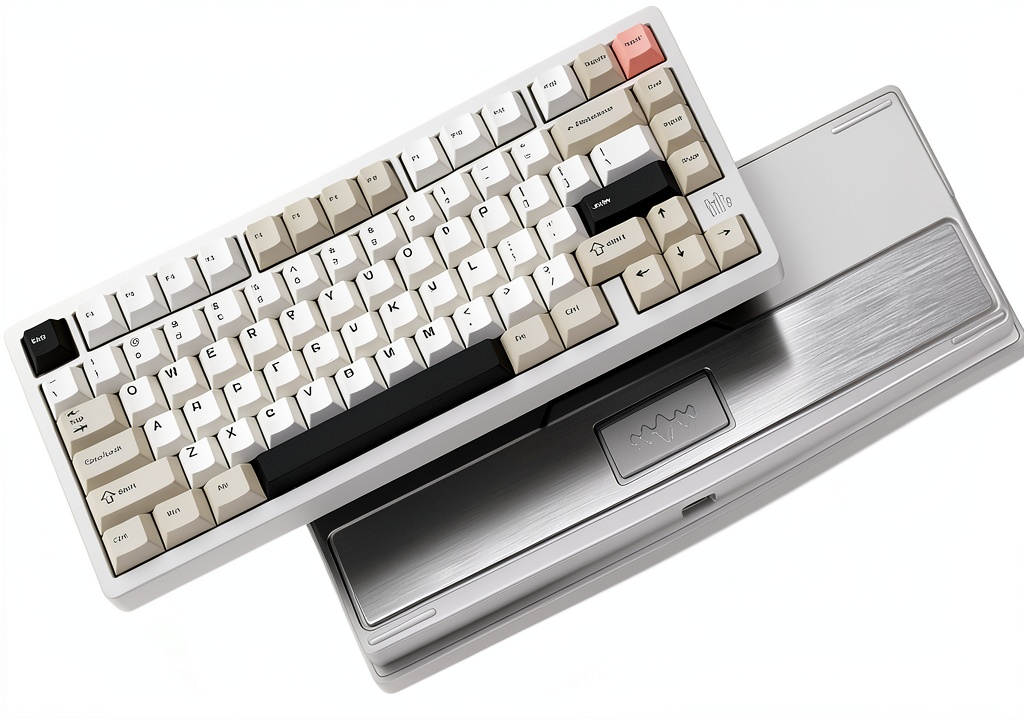
Unboxing the Womier RD75 Pro immediately reveals this isn’t a budget keyboard. The CNC aluminum frame has substantial heft – it weighs nearly 2.5 pounds, which provides excellent stability but makes it impractical as a travel companion. The tool-free ball-catch structure means you can disassemble it without screws, which I found genuinely useful when testing different switch combinations.
The magnetic PCB connector is a thoughtful touch that prevents damage during disassembly, something I’ve broken on cheaper keyboards when experimenting. However, the aluminum construction has a trade-off: during winter months, the metal frame feels noticeably cold to the touch for the first 10-15 minutes of use.
Performance in Real Use
Gaming performance surprised me. The 4ms 2.4GHz wireless latency feels indistinguishable from wired connections in actual gameplay. I tested this across competitive FPS titles and noticed no input delay issues. The pre-lubed POM linear switches provide consistent actuation, though they’re lighter than some gamers might prefer for tactical switches.
Where this keyboard truly shines is programming work. I programmed layer shortcuts for code compilation, debugging commands, and frequently used symbols. The ability to create momentary layers means I can access programming functions without leaving the home row. This saved me countless mouse movements and context switches during development sessions.
The 8000mAh battery delivers on its promises. With RGB at 50% brightness and daily 8-hour use, I only needed to charge every three weeks. This outperforms most wireless keyboards I’ve tested, though the charging time is correspondingly longer at about 4-5 hours for a full charge.
 Womier RD75 Pro keyboard on programmer’s desk with code editor visible” />
Ease of Use
Here’s where the Womier RD75 Pro reveals its learning curve. The tri-mode connectivity works flawlessly – switching between my desktop (2.4GHz), laptop (Bluetooth), and iPad (wired) takes seconds. The hardware experience is polished.
However, QMK/VIA programming requires technical comfort. While VIA provides a graphical interface, understanding layers, macros, and keycodes still has a steeper learning curve than mainstream software like Logitech Options or Razer Synapse. I spent several hours creating my ideal layout, whereas most gaming keyboards offer usable defaults out of the box.
Durability & Reliability
After two months of heavy use, the aluminum frame shows no wear, and the keycaps have minimal shine. The hot-swap sockets feel more secure than on some budget boards – I’ve swapped switches over a dozen times without loosening the sockets. The gasket mount provides pleasant flex that reduces bottom-out shock during long typing sessions.
The wireless reliability has been excellent with the 2.4GHz dongle, even in a crowded RF environment. Bluetooth performance is more variable – it occasionally requires re-pairing when switching between multiple devices, though this seems typical of most Bluetooth keyboards I’ve tested.
Pros & Cons
Pros:
- Unmatched customization through QMK/VIA programming
- Premium aluminum construction that feels durable and substantial
- Excellent battery life that actually matches advertised claims
- Versatile connectivity with reliable 2.4GHz performance
- Hot-swappable design makes switch experimentation accessible
Cons:
- Steep learning curve for programming features
- Heavy weight limits portability despite wireless capability
- Software feels dated compared to mainstream alternatives
- Default keycaps show fingerprints easily and feel budget-grade
- Bluetooth connectivity can be finicky with multiple device switching
Comparison & Alternatives
Cheaper Alternative: Keychron K2 Pro
The Keychron K2 Pro offers similar 75% layout and QMK support at around $30 less. I’ve used both, and the Keychron feels more plasticky but significantly lighter. The Womier wins on build materials and battery life, while the Keychron has better out-of-box keycaps and slightly more user-friendly software. Choose the Keychron if you want most of the programmability at a lower price and don’t mind plastic construction.
Premium Alternative: GMMK Pro
The GMMK Pro costs about $50 more and offers similar aluminum construction with more polished software and community support. Having tested both, the GMMK Pro feels more refined in finish and software experience, but the Womier matches it in raw programmability and exceeds it in battery life. Choose the GMMK Pro if you value polish over maximum battery life and don’t need wireless connectivity.
Buying Guide / Who Should Buy
Best for beginners: Surprisingly, beginners can enjoy this keyboard if they’re willing to learn. The hot-swap functionality makes switch experimentation easy without soldering, and you can ignore the programming features initially while still enjoying the solid build quality.
Best for professionals: Programmers, video editors, and power users will benefit most from the programmability. Creating workflow-specific layers and macros can save hours per week once configured properly.
Not recommended for: Frequent travelers who need lightweight gear, users who prefer simple plug-and-play operation, or those who primarily use Bluetooth with multiple device switching. The weight and programming complexity work against these use cases.
FAQ
Is the programming difficult to learn?
It depends on your technical comfort. The VIA software provides a visual interface, but understanding layers, tap dance, and other advanced features requires reading documentation and experimentation. Plan to spend 2-3 hours creating your first custom layout.
How does it compare to gaming brands like Razer or Logitech?
Gaming brands focus on RGB and gaming-specific features with more polished software. The Womier focuses on customization and build quality at the expense of user-friendly software. Choose gaming brands for out-of-box gaming optimization, choose Womier for long-term customization.
Is the battery life really 900 hours?
That’s with RGB off and conservative use. With typical RGB use, expect 200-300 hours – still excellent compared to most wireless keyboards. I got about three weeks of heavy use between charges.
Are the default switches good for typing?
The pre-lubed POM linear switches feel smooth and quiet, making them excellent for office environments. However, linear switches lack tactile feedback that some typists prefer. The hot-swap design makes trying different switches easy though.
Is it worth the price over cheaper alternatives?
Only if you value the aluminum construction and will use the programming capabilities. If you just want a solid wireless mechanical keyboard, cheaper options like Keychron provide 80% of the functionality at lower cost.
-
Sale!